 APTF
APTFALAllocationA portfolio of strategies and risk rules
Tool reviewSoftware
Edgewonk: the forex trader's journal that counts your state
The Edgewonk trader's journal differs from other trade logs by one decision: a state tag here is not a note in the margin but a measurement. It can be put into a breakdown of forex account statistics and answer a question an ordinary MT4/MT5 statement does not take on — what the trades marked as impulsive cost.
Edgewonk: a review of the mechanics and what it is not
This is a desktop program: it runs on your machine, the data sits on your disk, the internet is needed only for the licence. Trades get in via an export from the terminal — for forex that is an MT4/MT5 statement or a CSV.
+Calculates statistics broken down by your tagsThe main property. You create your own tags — «entry by plan», «after a stop», «outside the session» — and look at expectancy separately for each. That turns a conversation about discipline into a number.
+Stores data locallyNeither the account nor the statistics go anywhere. For those unwilling to hand their trade history to a third-party service, this is the decisive argument.
+Gives notes tied to a tradeThe reason for entry and the state are written next to a specific ticket, not into a separate file that a month later has nothing to be matched against.
+Analyses exits separately from entriesSeparate statistics on how much you left on the table and how much you sat through. For forex that is often more money than the quality of the entry.
−Does not import by itselfYou do the export from the terminal. Once a week that is five minutes, but it is a manual operation, and it gets skipped.
−Does not work on a phoneYou cannot tag your state from a phone right after a trade. The record is postponed, and a postponed record is always softer.
−Does not stop you breaking the rulesIt shows the price of a violation after the fact. At the moment of the breakdown the program takes no part at all.
−Does not replace the reviewThe numbers appear by themselves, the conclusions do not. An hour a week to read your own reports is still required.
The mechanism: why a breakdown by tags changes behaviour
An ordinary terminal statement knows the price, the size and the result. That is enough to judge the strategy and not enough to judge the execution. A breakdown by tags closes exactly that gap.
| Breakdown | What becomes visible | What decision follows |
|---|---|---|
| Entry by plan / off plan | Expectancy of the two groups separately | If the «off plan» group is negative, the question is not about the strategy |
| Before a stop / after a stop | The average size and result of the next trade | A pause after a loss becomes justified rather than invented |
| By time of day | The result by session and in the hours of fatigue | The schedule narrows to the window where the statistics are positive |
| By instrument | Pairs that get traded «while we are at it» | The list of instruments shrinks to the ones you know |
| By state at entry | The price of trades marked as impulsive | A sum appears that makes a limit worth introducing |
| By reason for exit | How much was left on the table by early exits | The exit rule is rewritten to fit the facts rather than a feeling |
Edgewonk: short answers
- Where the data is stored
- On your computer. The backup is your concern.
- How trades get in
- By exporting a statement from the terminal or a CSV, manually.
- Is the internet required
- For the work, no; for activating the licence, yes.
- Is it suitable for forex
- Yes, but the program is not forex-specific: points and lots are not its native units, as they are in FX Blue.
- Is there a mobile version
- No. State tagging is done at a computer.
- What to check before buying
- Your broker's export format and the current contents of the licence — on the developer's site.
The set of features and the licence terms are deliberately not listed here: they change more often than the page is updated.
What it looks like in practice: a month of work
An order in which the program survives to a second month. The main thing in it is not to create more than three tags at once.
01Three tags, no more
«By plan», «after a loss», «outside the session». Ten tags at the start guarantee that within two weeks you will stop applying them.
day one02An import once a week
Exporting the statement and filling in the tags while the memory is fresh. Later than a week and memory has already fitted the reason to the result.
5 minutes a week03The first breakdown — after forty trades
Earlier than that the sample shows nothing: the difference between groups will be noise, not signal.
1–2 months04One rule as a result
Exactly one change is taken from a breakdown. Two at once is not allowed: afterwards you cannot tell what worked.
following the reviewWho Edgewonk is justified for and who it is not
suitableThose who already have a strategyThe program measures the execution of known rules. If the rules are not written down there is nothing to measure, and the breakdown will show random groups.
suitableThose who do not give their history to servicesLocal storage is a rare property among journals. For many that is the only argument needed.
not suitableThose who do not keep recordsA paid program does not create the habit. If a spreadsheet did not survive a month, a licence will not help — the habit comes first.
debatableBeginners before their first hundred tradesBreakdowns require a sample. Below forty or fifty trades a spreadsheet and the losing-streak calculationare enough to tell a norm from a breakage.
What to replace it with if you would rather not pay
A breakdown by tags is not the program's magic, it is a pivot table. Below is the same thing by hand, with the honest price of each option.
01A spreadsheet with a tag column
The nine columns from our journal breakdown plus one text column for the tag. A pivot on that column gives the same breakdown for nothing and half an hour of setup.
free, half an hour02Free account analytics
FX Blue calculates statistics on an MT4/MT5 account for free. There are no state tags there, but everything else is.
free03An online journal with tags
Tradervue closes the same task in a browser and lets you show the journal to a mentor with a link.
free tier availableWhat the «off-plan» group costs: a review on a sample
It is for this number that a tagged journal is kept. Take a $10,000 account, a risk of 1 % ($100) and a sample of sixty trades split by a tag into two groups.
| Group | Trades | Average per trade | Group total |
|---|---|---|---|
| Entry by plan | 42 | +0.25R | +$1,050 |
| Entry off plan | 18 | −0.40R | −$720 |
| Actual total | 60 | +0.055R | +$330 |
| If all had been by plan | 60 | +0.25R | +$1,500 |
The price of the violations on this sample is $1,170, or 11.7 % of the account over sixty trades. Without the breakdown by tag all you see is «+$330, a month in the black», and there is no reason to change anything. The costs of those eighteen entries can be calculated separately with the cost-of-a-trade calculator.
Frequently asked questions
Is Edgewonk suitable for forex?
Yes, MT4/MT5 statements import. But the program is not tailored to the currency market: calculation in points and lots is not native to it, unlike FX Blue. If you specifically need forex arithmetic, it is worth keeping both tools.
How is it better than an ordinary spreadsheet?
It saves time on calculations and does not let you break the formula. In substance a spreadsheet does the same thing, if you are willing to set it up and maintain it. It is better to start the first month with a spreadsheet.
Is the data definitely not going anywhere?
The program is a desktop one and keeps its database locally. It is worth checking this yourself in the current version: we do not publish claims about a product that we cannot re-verify as of the moment you read them.
How many trades are needed for a breakdown to show anything?
The guide is forty in each group being compared. At twenty the difference between groups is almost always explained by chance.
Will it replace a daily limit?
No, these are tools of different classes. A journal shows the price of a violation after the fact, while a limiter expert advisor stops it at the moment of the breakdown.
What to do if the tags stop being applied?
Cut their number to one and apply only that one. A single tag that lives for six months is more useful than ten abandoned in the second week.
Other tools in this section
FTForex TesterA history simulator for manual practice
Tool reviewFBFX BlueFree account analytics and a simulator
Tool reviewTVTradervueAn online journal with review
Tool reviewEALimiter expert advisorA class of tools, not a brand
Tool review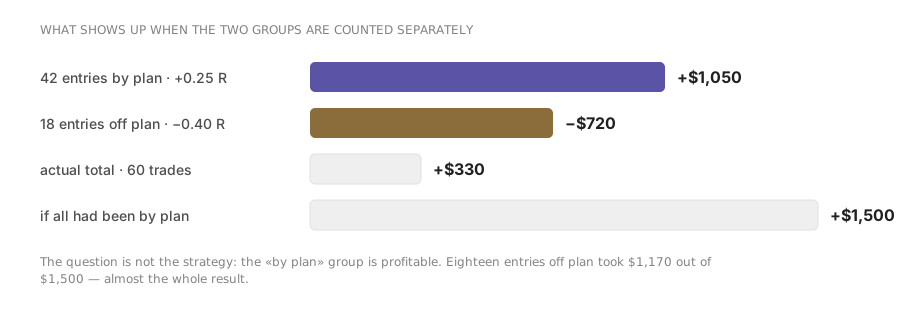
Read next
