 APTF
APTFALAllocationA portfolio of strategies and risk rules
Tool reviewSoftware
Tradervue: a forex trade journal in the browser
The online trade journal Tradervue solves a task a desktop journal handles badly: showing your trades to another person. The forex account journal lives in the browser, opens with a link, and a review stops being an exchange of screenshots. For those learning with a mentor or in a group, that is the main argument.
Tradervue: how it works and what the service is not
A web service: trades are uploaded by an export from the terminal or by connecting a broker, stored on the service's side, and accessed from any browser. Forex is supported through MT4/MT5 reports.
+Opens with a linkThe journal or an individual trade can be shown to a mentor, a colleague or a community without collecting screenshots or sending a file.
+Tags and notes on every tradeThe same mechanics as in desktop journals: your own labels, which a breakdown is then built on.
+Works from a phoneA mark can be made right after the trade closes, while the reason has not yet been rewritten by memory.
+There is a free modeEnough to work out whether you will keep a journal at all, before any payment.
−The history sits with the serviceFor some traders that is a deal-breaker. There is no local mode: if your trade history must not leave your computer, look at desktop journals.
−Not forex-specificThe service grew up around stocks and futures. Currency pairs are supported, but points and lots are not its native units.
−The free mode is limitedA cap on the number of trades per month exists and changes. The current one is only on the service's own site.
−Does not stop you breaking the rulesLike any journal, it works after the fact. At the moment of a breakdown it takes no part.
A review through someone else's eyes: why it is needed and what is risky about it
An open journal changes not the calculations but the behaviour — and in both directions. This is worth settling with yourself before the link has been sent to anyone.
| What changes | The useful effect | The other side |
|---|---|---|
| Records are kept more regularly | An outside reader is a strong reason not to skip a week | The records become tidier but softer: what is awkward is left out |
| Reasons are put into words | A vague «it looked like it» has to be brought up to the level of a criterion | The temptation appears to invent a reason after the fact |
| Mistakes are named out loud | Someone else's eye catches the systematic thing you have stopped noticing | Criticism is easier to take as a judgement of you rather than of a decision |
| An audience appears | Discipline grows: a breakdown will have to be explained | So does trading for an audience — the worst of the added emotions |
Tradervue: short answers
- Where the data is stored
- On the service's servers. There is no local mode.
- How trades get in
- An export from the terminal, CSV, a broker connection.
- Does it work with MT4/MT5
- Yes, through the terminal's reports.
- Is there a free mode
- Yes, with a cap on the number of trades per month.
- Can the journal be shown to another person
- Yes, by a link — that is its key property.
- What to check before paying
- The current limits of the free mode and support for exports from your broker.
Limits and prices are not named here: they change, and an out-of-date figure is worse than none.
How to start so that the journal lives longer than a month
01Upload last month
History first, not current trades: that way you see straight away what there is to write about and which tags you need.
20 minutes02Set up two labels
«By the plan» and «outside the plan». The rest are added only when those two stop being enough.
day one03Write the reason before the result
The note is made at entry, not at the close. Otherwise the wording will adjust to the outcome and the breakdown will become useless.
every trade04Show the journal to one person
Not to a community. A single reader gives you discipline without an audience and without playing to the crowd.
from the second monthWho Tradervue is justified for and who it is not
suitableFor those learning with a mentorA link instead of screenshots saves both sides time and removes the question «show me what actually happened».
suitableFor those who trade from different devicesA browser and a phone let you record your state right after the trade rather than in the evening from memory.
not suitableFor those who do not send their history outsideThe data sits with the service. That is neither good nor bad, but it is a decision taken once and deliberately.
debatableFor pure forex tradersEverything works, but the arithmetic of points and lots is more at home in FX Blue. They are often kept together: one counts, the other stores the review.
What to write in a note so that it is useful a quarter later
An empty note field is the main reason journals get abandoned: it is unclear what to write there. Below is a four-line format that takes forty seconds to fill in and is still readable a quarter later.
| Line | What to write | Why it is needed later |
|---|---|---|
| Signal | The entry condition in one phrase, word for word from the plan | A month later it separates trades taken by the rule from ones that merely resemble it |
| State | One word: calm, hurry, anger, boredom | The only column that is not in the broker's report |
| What came before it | The previous trade and its result | Shows the chains: revenge trading is visible only in pairs |
| What was missing | What stopped you carrying out the plan in full | Accumulates into a list of rule edits for the monthly review |
What the «after a stop» tag shows: an example breakdown
The cheapest breakdown there is — one label on trades opened immediately after a losing one. A $10,000 account, 1 % risk, sixty trades a month.
| Group | Trades | Average size | Result |
|---|---|---|---|
| Ordinary entries | 42 | 1.0 lots of the plan | +9.0 % of the account |
| The first 30 minutes after a stop | 18 | 1.6 lots of the plan | −6.2 % of the account |
| The month's total | 60 | — | +2.8 % of the account |
The conclusion from a table like this is not «I must be calmer» but a rule with a number: a thirty-minute pause after a loss. It is checked with the same journal a month later. What the growth in size after a stop costs in itself is worked out by the revenge trading calculator.
Frequently asked questions
How does Tradervue differ from Edgewonk?
In where the data is stored and how it is accessed. Tradervue is the browser and the service's server, but the journal opens with a link and works from a phone. Edgewonk is a desktop program with local data and more developed breakdowns by label.
Can a forex journal be kept for free?
Yes. The service's free mode plus a spreadsheet cover the task completely. Paying makes sense once you know exactly which breakdown you are missing.
Is it dangerous to publish trades publicly?
Publicity adds an emotion that was not there: the wish to look consistent. Showing them to one reader is safer than to a community.
Does the service count points and swaps?
The result is imported from the broker's report, so swaps and commissions are accounted for. Do not expect separate forex arithmetic such as point value by pair.
Does an online journal replace a state journal?
Only if you write your state into it. Technically the field is there, but it is filled in by you — no service does that.
What happens to the records if I stop paying?
That is a question for the service's current terms, and it is worth finding out before a year's work has accumulated in the journal. It is worth testing the export of your own data in the very first month.
Other tools in this section
EWEdgewonkA journal that analyses your state
Tool reviewFTForex TesterA history simulator for manual practice
Tool reviewFBFX BlueFree account analytics and a simulator
Tool reviewEALimiter expert advisorA class of tools, not a brand
Tool review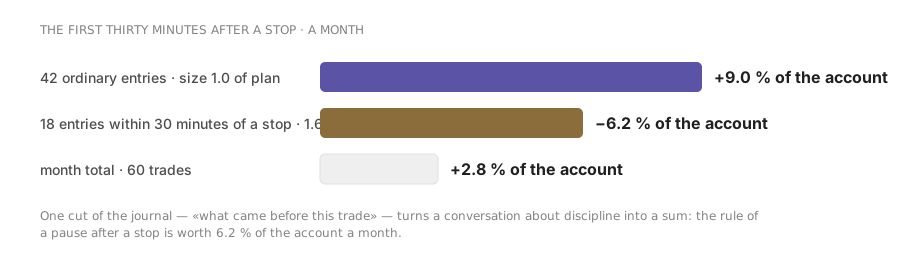
Read next
